Home / Guides / Split Nested JSON into Related CSV Files
Split Nested JSON into Related CSV Files
When a JSON record contains a list of child records, do not squeeze that list into one CSV cell if you need to filter or total the children. Write one CSV for the parent records and another for the child records, then repeat the parent ID in every child row.
For an order with several line items, keep each order once in orders.csv, write each item to items.csv, and include order_id in both files. Join on that key when a report needs both tables. This keeps order totals from being repeated as item rows.
order_id,customer_name,total
A-104,Rin Park,32.00order_id,item_number,sku,qty
A-104,1,MUG-1,2
A-104,2,TEA-4,1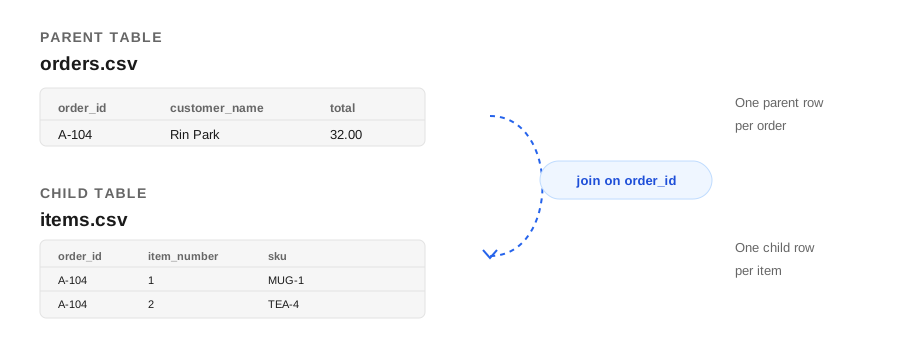
The two files answer different questions. Count orders or sum order revenue from orders.csv. Rank products or quantities from items.csv. Join them on order_id only when a report needs fields from both.
Example: orders and line items
This input has one order, a nested customer object, and two child items:
[
  {
    "order_id": "A-104",
    "customer": { "id": "C-7", "name": "Rin Park" },
    "order_date": "2026-09-27",
    "currency": "USD",
    "total": 32.00,
    "items": [
      { "sku": "MUG-1", "qty": 2, "unit_price": 12.00 },
      { "sku": "TEA-4", "qty": 1, "unit_price": 8.00 }
    ]
  }
]
The parent output has one row for the order:
order_id,customer_id,customer_name,order_date,currency,total
A-104,C-7,Rin Park,2026-09-27,USD,32.0
The child output has one row per item, plus the key needed to reconnect it:
order_id,item_number,sku,qty,unit_price
A-104,1,MUG-1,2,12.0
A-104,2,TEA-4,1,8.0
Write both files with Python
This standard-library example is mapped to the input above. Change the field names to match your JSON. It rejects malformed parent or child records and duplicate or missing order IDs before writing output.
import csv
import json

with open("orders.json", encoding="utf-8") as source:
    orders = json.load(source)

if not isinstance(orders, list):
    raise ValueError("Expected a JSON array of orders")

order_fields = [
    "order_id", "customer_id", "customer_name",
    "order_date", "currency", "total",
]
item_fields = ["order_id", "item_number", "sku", "qty", "unit_price"]
order_rows = []
item_rows = []
seen_order_ids = set()

for order in orders:
    if not isinstance(order, dict):
        raise ValueError("Every order must be a JSON object")

    order_id = order.get("order_id")
    if order_id in (None, "") or order_id in seen_order_ids:
        raise ValueError(f"Missing or duplicate order_id: {order_id!r}")
    seen_order_ids.add(order_id)

    customer = order.get("customer") or {}
    if not isinstance(customer, dict):
        raise ValueError(f"customer must be an object for order {order_id}")

    order_rows.append({
        "order_id": order_id,
        "customer_id": customer.get("id"),
        "customer_name": customer.get("name"),
        "order_date": order.get("order_date"),
        "currency": order.get("currency"),
        "total": order.get("total"),
    })

    items = order.get("items") or []
    if not isinstance(items, list):
        raise ValueError(f"items must be a list for order {order_id}")

    for item_number, item in enumerate(items, start=1):
        if not isinstance(item, dict):
            raise ValueError(f"Each item must be an object for order {order_id}")
        item_rows.append({
            "order_id": order_id,
            "item_number": item_number,
            "sku": item.get("sku"),
            "qty": item.get("qty"),
            "unit_price": item.get("unit_price"),
        })

def write_csv(path, fields, rows):
    with open(path, "w", newline="", encoding="utf-8") as output:
        writer = csv.DictWriter(output, fieldnames=fields, extrasaction="raise")
        writer.writeheader()
        writer.writerows(rows)

write_csv("orders.csv", order_fields, order_rows)
write_csv("items.csv", item_fields, item_rows)
Python's csv.DictWriter writes each dictionary in the field order you provide. Keeping field lists explicit makes the output schema visible and rejects unexpected row keys.
Check the relationship before using the CSVs
- Count parent rows.
orders.csvshould have one data row per input order. - Count child rows.
items.csvshould have one data row per input item. An order with an empty item list adds no child rows. - Check every key. Each
items.csvorder_idshould exist inorders.csv. - Check items by parent. Group child rows by
order_idand compare the count to the source item's count for that order. - Aggregate before joining. A join repeats an order's total once for every matching item. Sum order totals from the parent table before joining, or calculate a line-item measure from the child table.
Keys need to identify one parent. If an order ID is missing or reused for two orders, child rows cannot be joined unambiguously. Use a stable source ID when one exists; a row number is only a temporary fallback for one export.
When should you keep one CSV?
Keep one CSV when each top-level array element is already one row and nested values only need to be displayed. A JSON array inside one cell can be acceptable for a compact record view. Split the child array into its own file when its elements have fields that need their own filters, counts, or totals. For a single-level array of objects, the JSON to CSV converter can create a flat table directly.
Common mistakes
- Putting child records in one cell. Individual items cannot be filtered until the cell is parsed again.
- Repeating the parent total and summing after a join. One order with three items contributes the same order total three times to the joined rows.
- Dropping the parent key. Without
order_id, a child row cannot be reliably reconnected. - Treating a generated line number as permanent. An item number based on array position can change when source order changes. Prefer a source-provided item ID for recurring exports.
Questions people ask
Can I convert nested JSON with arrays to CSV?
Yes. If child array elements have their own fields and need to be filtered or counted, write a parent CSV and a child CSV, and repeat the parent key in each child row.
How do I join the CSV files?
Join the child file to the parent file using the shared parent key, such as order_id. In a spreadsheet, use a lookup or Power Query merge; in a database, join the imported tables on that key.
Why are order totals duplicated after a join?
A parent total repeats once for every matching child row. Aggregate parent totals before joining, or calculate the measure from child rows when appropriate.
What if the child objects already have IDs?
Export the source ID as an item_id column and keep order_id as well. The item ID identifies the child record; the order ID identifies its parent.