Guides / JSON field states
Keep Missing, Null and Empty JSON Fields Distinct in CSV
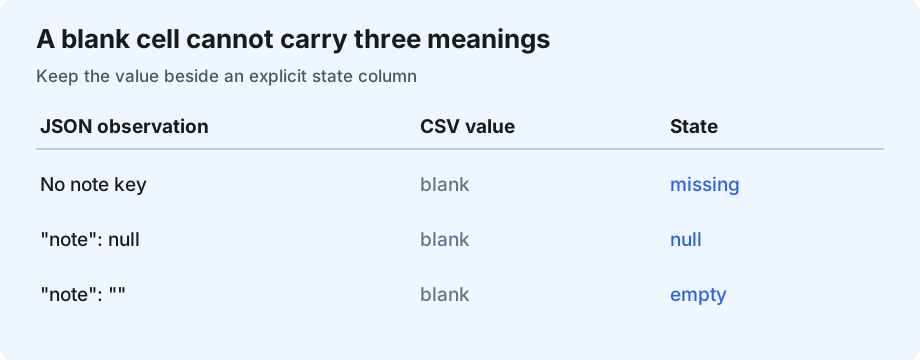
Add an explicit state column when the difference matters. A blank CSV cell alone cannot tell a reader whether a JSON key was absent, its value was null, or it contained "". Export the value beside a field such as note_state, with missing, null, empty or value. Agree on those labels with the receiver before exporting.
A JSON to CSV converter needs an output policy as well as a delimiter. This guide covers one gap: preserving the meaning of an empty-looking scalar field. It does not flatten nested arrays or infer what a missing value means in your application.
Use a source that exposes the ambiguity
These synthetic records have the same field in different states. The final record contains the literal text null; it is a string, not the JSON null value.
[
  {"id":"A1"},
  {"id":"A2","note":null},
  {"id":"A3","note":""},
  {"id":"A4","note":"null"},
  {"id":"A5","note":"Call, then email"}
]
Download the original JSON sample. RFC 8259 defines null as a JSON literal and strings as a separate value type. A missing member is an observation about an object, not another JSON value type. Neither missing nor null automatically means “unknown,” “deleted” or “not applicable”; those meanings come from the source system.
A contract that survives a CSV round trip
| Input observation | note | note_state | Reconstruction |
|---|---|---|---|
| No note key | blank | missing | Omit the key |
| JSON null | blank | null | Set note to null |
| Empty string | blank | empty | Set note to "" |
| String "null" | null | value | Keep the string |
The state labels are our example contract, not a CSV standard. Reserve a distinct state column name so it cannot collide with a source field. Keep the original JSON when you cannot change the receiving CSV schema. This example handles strings, null and absent keys only; numeric and Boolean values need a separate type policy.
Generate and inspect the exact CSV
The sample has five records and three output columns, including the state column.
Click Generate sample CSV to inspect the result.Download the generated CSV
With this contract, the first three value cells remain blank but their states differ. The comma in the last note is enclosed in a quoted CSV field; it does not create an extra column. Quoting a blank field is not a portable null policy: RFC 4180 describes CSV field syntax without defining application-level null markers.
Apply the same decision to your export
- Check key presence before reading the value. In JavaScript, use
Object.hasOwn(record, 'note'); a fallback such asrecord.note || ''also collapses false and zero. - Check strict null next, then the empty string. Keep ordinary strings unchanged, including the text
null. - Write the value and state together. Use a CSV writer or correct escaping for quotes, commas and newlines.
- Parse the exported CSV and reconstruct the three empty-looking cases. Compare key presence as well as values with the original objects.
Question: What if only some records contain a field?
A public question about missing field names describes this problem. Keep the column in a fixed header and leave the value blank in rows without that key. If you also need to distinguish an absent key from null or empty text, include the state column. Dropping the column or shifting later cells changes the meaning of the record.
Sources and related checks
RFC 8259: JSON values · RFC 4180: CSV field format · Object.hasOwn reference. The sample, state contract, exporter and diagram are original material.
Verify every exported row and field · Open the JSON to CSV tool