Home / Guides / Verify JSON to CSV
Verify Every Row and Field After JSON to CSV Conversion
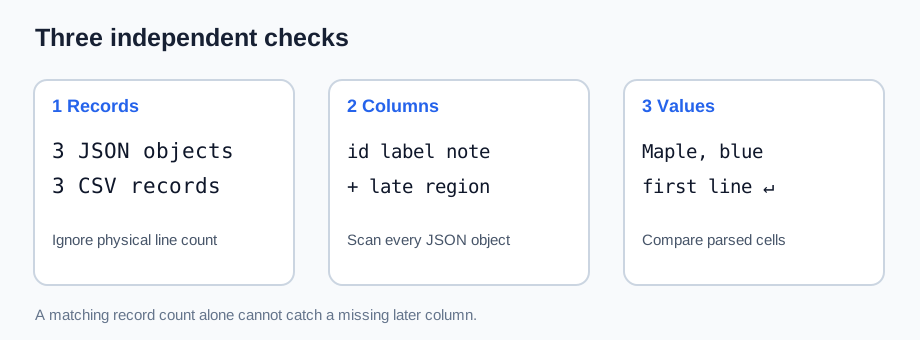
A matching file size or line count cannot prove a JSON-to-CSV export is complete. Count parsed CSV records, compare the header with the union of keys across all JSON objects, then compare every output cell with its source value.
For a flat array of string-valued objects, verify one data row per input object, one column per key found anywhere in the array, and an exact value match for each cell. Use a CSV parser, not a raw newline count: a quoted cell may itself contain a line break. The checker below reports the first missing row, missing column, shifted cell, or changed value.
A sample that exposes quiet losses
The first record has a comma in label and a line break in note. The region key appears only in later records. A converter that builds its header from the first object alone may silently omit that column.
[
  {
    "record_id": "R-101",
    "label": "Maple, blue",
    "note": "first line\nsecond line"
  },
  {
    "record_id": "R-102",
    "label": "Cedar",
    "region": "West"
  },
  {
    "record_id": "R-103",
    "label": "Spruce",
    "region": "East"
  }
]
The expected CSV has 3 data records and 4 columns. Its quoted note spans two physical text lines, so a text editor shows more lines than there are CSV records.
record_id,label,note,region
R-101,"Maple, blue","first line
second line",
R-102,Cedar,,West
R-103,Spruce,,East
Download sample JSON · Download expected CSV · Download checker
Run the exact-value check
Save all three downloads in one folder, then run python audit-json-to-csv-check.py. Replace the CSV file with your own export of the same JSON to audit that converter. This script intentionally handles only a flat JSON array whose values are strings; it does not guess how nested objects, numbers, booleans, or nulls should be serialized.
"""Check a flat, string-valued JSON array against a CSV export."""
import csv
import json
from pathlib import Path

source = json.loads(Path("audit-json-to-csv-source.json").read_text(encoding="utf-8"))
if not isinstance(source, list) or not all(isinstance(r, dict) for r in source):
    raise ValueError("Expected a JSON array of objects")
if not all(isinstance(v, str) for r in source for v in r.values()):
    raise ValueError("This exact-value example expects string fields")

expected_columns = list(dict.fromkeys(k for r in source for k in r))
with open("audit-json-to-csv-export.csv", newline="", encoding="utf-8-sig") as stream:
    records = list(csv.reader(stream))
if not records:
    raise ValueError("CSV is empty")
header, rows = records[0], records[1:]
if header != expected_columns or len(header) != len(set(header)):
    raise ValueError(f"Header mismatch: expected {expected_columns}, got {header}")
if len(rows) != len(source):
    raise ValueError(f"Row mismatch: expected {len(source)}, got {len(rows)}")
for number, (original, cells) in enumerate(zip(source, rows), start=2):
    if len(cells) != len(header):
        raise ValueError(f"CSV record {number}: expected {len(header)} cells, got {len(cells)}")
    for column, actual in zip(header, cells):
        expected = original.get(column, "")
        if actual != expected:
            raise ValueError(f"CSV record {number}, {column}: {actual!r} != {expected!r}")
print(f"PASS: {len(rows)} data rows, {len(header)} columns, every string cell matched")
For the supplied files the output is PASS: 3 data rows, 4 columns, every string cell matched. Delete the region header and the checker reports a header mismatch, even though the data row count remains three. Drop the last record and it reports a row mismatch. Change Maple, blue or the embedded newline and it reports the first cell mismatch.
Why these checks work
- Count parsed records. RFC 4180 allows a quoted field to contain line breaks, so counting physical lines can overstate the number of CSV records.
- Scan every source object for keys. A later-only key is easy to miss when a header is inferred from the first object. The expected header here is
record_id,label,note,region. - Compare cell strings. Correct row and column counts still cannot detect a changed value or a shifted field. The script compares every parsed cell with the corresponding source record. Python's csv module handles quoted commas and embedded newlines when the file is opened with
newline="".
Scope: A blank CSV field cannot, by itself, reveal whether the JSON key was absent or present with an empty string. This check verifies the selected flat-string export rule, where either maps to an empty cell. If your schema needs those cases distinguished, specify that rule before export and validate it separately.
A real question: fields missing from some records
A Stack Overflow user asked how to keep a column when some JSON records do not contain that key. Build the header from all records, then leave that cell blank in records where the key is absent. In this sample, region exists in records 2 and 3; record 1 gets an empty region cell. The downloadable checker confirms the column is present and the other cells stay aligned.