Guides / Scalar arrays
JSON Primitive Array to CSV: Keep Index, Type and Value
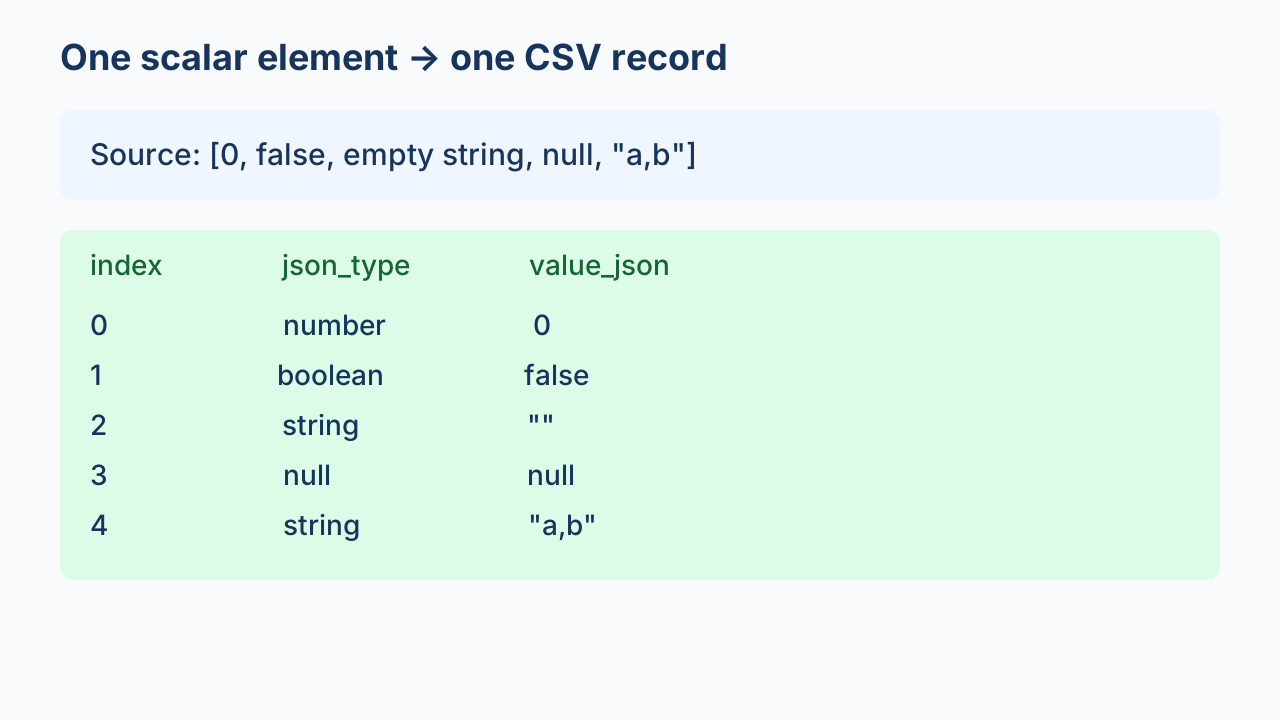
For a JSON array of scalar values, write one CSV row per element with an index, a JSON type and a JSON-encoded value. Do not discard false, zero, null or an empty string. The index preserves array order, and the encoded value lets you distinguish a string from a number when reconstructing the array.
Choose the row unit before converting
An array such as [0,false,"",null,"a,b"] has elements, not object property names. This guide chooses one row per element. The JSON specification defines an array as ordered and allows elements of different types. Keep that order explicitly when exporting a table.
This is a mapping contract rather than a universal CSV requirement. A consumer that needs one horizontal row instead should specify that contract first. For an array of objects, use the object-to-column workflow; do not silently apply it to scalar values.
Download the original five-element example
python primitive-array-to-csv.py primitive-array.json new-output.csvUse a new output filename. The script loads this small file into memory, accepts only scalar elements and rejects nested arrays or objects. Empty arrays produce a header-only CSV. It is not a streaming exporter.
What the three columns mean
| index | json_type | value_json after CSV parsing |
|---|---|---|
0 | number | 0 |
1 | boolean | false |
2 | string | "" |
3 | null | null |
4 | string | "a,b" |
The index is zero-based. value_json contains a complete JSON scalar, so an empty string is represented by two quote characters and null by null. These are not blank cells. The type column is a readable check against the decoded value.
The local run produced 5 data records and 3 columns. It parsed the CSV, checked index order and type labels, reconstructed the array, and compared both Python types and values with the source. All five matched. The downloadable evidence identifies this original fixture; these numbers do not describe arbitrary files or spreadsheet imports.
Two layers of escaping
The JSON encoder produces the JSON scalar text. The CSV writer then quotes that text for CSV. The string "a,b" remains one field when read by a CSV parser. Do not split output on commas or count physical lines as records.
Decode in the reverse order: parse CSV fields first, then decode the value_json field as JSON. The table above shows parsed cell contents rather than raw CSV quote syntax. Treat the downloaded CSV as an interchange file and deliberately configure the receiving application.
Question: Should false, zero, null and an empty string disappear from the array?
No: they are array elements and each gets a row under this contract. Avoid filters such as if value, which would remove these elements in Python. Check the array length and the sequence of indices instead. Keep null as a JSON value rather than treating it as a missing element.
Read the full example
Show the original Python mapping
"""Small scalar-array mapping, with CSV-to-JSON semantic reconstruction.
python primitive-array-to-csv.py primitive-array.json new-output.csv
"""
import csv,json,sys
from pathlib import Path

def reject_constant(value):raise ValueError('non-JSON constant: '+value)
def kind(value):
    if value is None:return 'null'
    if isinstance(value,bool):return 'boolean'
    if isinstance(value,(int,float)):return 'number'
    if isinstance(value,str):return 'string'
    raise ValueError('only scalar array elements supported')

def export(source,target):
    values=json.loads(Path(source).read_text(encoding='utf-8'),parse_constant=reject_constant)
    if not isinstance(values,list):raise ValueError('top-level array required')
    rows=[[i,kind(value),json.dumps(value,ensure_ascii=False,allow_nan=False)]
          for i,value in enumerate(values)]
    with Path(target).open('x',encoding='utf-8',newline='') as file:
        writer=csv.writer(file);writer.writerow(['index','json_type','value_json']);writer.writerows(rows)
    with Path(target).open(encoding='utf-8',newline='') as file:parsed=list(csv.DictReader(file))
    restored=[]
    for expected,row in enumerate(parsed):
        if int(row['index'])!=expected:raise ValueError('index order changed')
        value=json.loads(row['value_json'],parse_constant=reject_constant)
        if kind(value)!=row['json_type']:raise ValueError('type mismatch')
        restored.append(value)
    if len(restored)!=len(values) or any(type(a)!=type(b) or a!=b for a,b in zip(values,restored)):
        raise ValueError('semantic reconstruction mismatch')
    return {'records':len(parsed),'columns':3,'rows':parsed,'restored':restored,'type_and_value_match':True}

if __name__=='__main__':print(json.dumps(export(*sys.argv[1:3]),ensure_ascii=False))
Watch the mapping
What the reconstruction proves
The comparison includes types because a loose equality check can treat a boolean and a number as equal. The exporter checks booleans before numbers when assigning labels. A type mismatch or reordered index stops verification.
This example preserves decoded values in its demonstrated range, not original byte spelling, whitespace, numeric exponent notation or escape spelling. Python's ordinary floating-point decoding is not a precision-preservation policy for arbitrary decimal numbers. Keep the raw source and define a numeric contract before applying the script to precision-sensitive data.
A spreadsheet may infer cell types when opening CSV. This run verifies the CSV parser and JSON reconstruction only, not Excel or every other application. For object fields, missing, null and empty need a separate field-state policy. For any export, verify rows and values.