Guides / JSONL error recovery
Convert JSONL to CSV Without Silently Losing Bad Lines
Read JSONL one physical line at a time. Export accepted objects to CSV and save every rejected line in a separate file with its original line number and reason. Reconcile input lines = accepted records + rejected lines. Do not quietly skip errors or renumber the remaining records.
This workflow prepares a damaged JSONL file for a JSON to CSV converter. It produces an auditable partial export, not a claim that the whole source converted successfully. Keep the untouched input until every rejection is resolved.
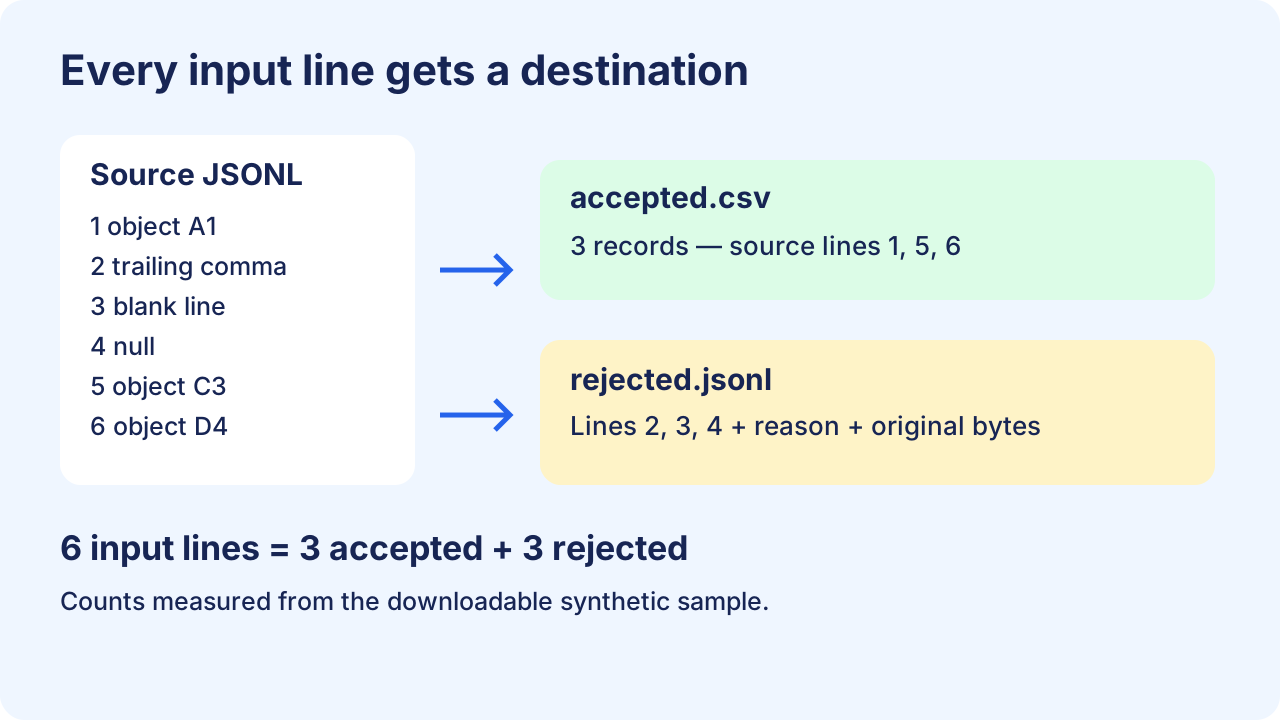
Start with a source that fails in different ways
Download the original JSONL fixture. Line 2 has a trailing comma, line 3 is blank, and line 4 contains null. The escaped newline inside line 5 remains part of that one JSONL record.
{"id":"A1","note":"ready"}
{"id":"B2","note":"broken",}

null
{"id":"C3","note":"line one\nline two","region":"west"}
{"id":"D4","note":"comma, kept"}
JSON Lines requires UTF-8 and one valid JSON value per line. A blank line is invalid, but null is valid JSONL. This export policy accepts objects only, so it records line 4 as a shape rejection rather than calling it malformed JSON. Pretty-printed, multiline objects need a different parser; this script does not reconstruct them.
Run the downloadable quarantine script
Save quarantine-jsonl.py beside the fixture. It uses Python 3's standard library. Choose a new output directory; an existing directory is refused to avoid overwriting an earlier run.
python quarantine-jsonl.py jsonl-quarantine-sample.jsonl run-001The script retains original bytes for rejected lines as Base64, including their line endings. That keeps invalid UTF-8 recoverable without inserting replacement characters. Accepted CSV rows carry a source_line column. Source keys are prefixed with data. so a source field named source_line cannot overwrite this provenance.
Show the complete Python script
"""Python 3: isolate invalid JSONL lines; export accepted objects as CSV.
Run: python quarantine-jsonl.py input.jsonl new-output-directory
Output directory must not exist. This example retains accepted rows in memory.
"""
import base64
import csv
import json
import sys
from pathlib import Path

def reject_constant(token):
    raise ValueError("non-JSON constant: " + token)

def unique_keys(pairs):
    result = {}
    for key, value in pairs:
        if key in result:
            raise ValueError("duplicate key: " + key)
        result[key] = value
    return result

def cell(value):
    if isinstance(value, str):
        return value
    return json.dumps(value, ensure_ascii=False, allow_nan=False,
                      separators=(",", ":"))

source, destination = map(Path, sys.argv[1:3])
destination.mkdir(parents=True, exist_ok=False)
accepted, rejected, fields = [], [], []
line_count = 0
with source.open("rb") as stream:
    for line_number, raw in enumerate(stream, 1):
        line_count = line_number
        try:
            text = raw.decode("utf-8")
            if not text.strip():
                raise ValueError("blank line")
            record = json.loads(text, parse_constant=reject_constant,
                                object_pairs_hook=unique_keys)
            if not isinstance(record, dict):
                raise ValueError("valid JSON, but expected an object")
        except (UnicodeDecodeError, ValueError) as error:
            rejected.append({"source_line": line_number,
                             "reason": str(error),
                             "raw_base64": base64.b64encode(raw).decode("ascii")})
            continue
        accepted.append((line_number, record))
        for field in record:
            if field not in fields:
                fields.append(field)

# Prefix source keys so they cannot collide with the provenance column.
with (destination / "accepted.csv").open("w", encoding="utf-8", newline="") as stream:
    writer = csv.writer(stream)
    writer.writerow(["source_line"] + ["data." + key for key in fields])
    for line_number, record in accepted:
        writer.writerow([line_number] + [cell(record[key]) if key in record else ""
                                        for key in fields])
with (destination / "rejected.jsonl").open("w", encoding="utf-8", newline="\n") as stream:
    for entry in rejected:
        stream.write(json.dumps(entry, ensure_ascii=False) + "\n")
report = {"physical_lines": line_count, "accepted": len(accepted),
          "rejected": len(rejected),
          "balanced": line_count == len(accepted) + len(rejected)}
(destination / "report.json").write_text(json.dumps(report, indent=2) + "\n", encoding="utf-8")
print(json.dumps(report))
Inspect both outputs before using the CSV
| File | Expected result for this fixture | What to check |
|---|---|---|
| accepted.csv | 3 data records, 4 columns | source_line values are 1, 5, 6; data.region is included even though it appears late |
| rejected.jsonl | 3 rejection records | source_line values are 2, 3, 4; each has a reason and raw_base64 |
| report.json | physical_lines: 6; accepted: 3; rejected: 3; balanced: true | 6 = 3 + 3; inspect the rejection reasons even when balanced is true |
Download the measured outputs: accepted CSV, rejection log, count report. Their numbers come from running the provided script on the provided fixture. A balanced report proves each physical input line was assigned a destination, not that the data is semantically correct.
Parse the output with a CSV reader when counting records. Line 5's decoded note includes a newline, so the CSV writer quotes a multiline field. Counting text lines in the CSV would give the wrong record count. Python's csv documentation specifies opening CSV files with newline='' and provides readers that handle quoting.
Question: Can I ignore a bad JSONL line and continue?
You can continue parsing independent later lines, but retain the rejected line and mark the export incomplete. In this sample, accepted records retain line numbers 1, 5 and 6. A catch-and-continue loop with no rejection file would conceal three excluded lines. Decode a rejection's raw_base64 to recover its exact input bytes; repair it against the original source, then rerun the entire corrected file into a new directory. Appending repaired rows blindly can introduce duplicates and reorder records.
See the workflow
Know this example's boundaries
- The script rejects duplicate object keys and NaN/Infinity. Python's default JSON decoder can accept these cases;
object_pairs_hookandparse_constantmake this export policy explicit. See Python JSON compliance notes. - Missing fields become empty cells; null becomes the text
null; nested values become JSON text. This is a documented projection, not a complete reversible type encoding. String"null"and JSON null can look the same in CSV. - Accepted records and rejections are held in memory to build a header union. Use a two-pass or disk-backed design for large inputs; reading line by line alone does not make this implementation memory bounded.
- Numeric spellings may normalize during parsing. Preserve IDs as strings and use an appropriate decimal parser for exact financial quantities. This article addresses error isolation, not every numeric conversion policy.
- I/O failures stop the run. Treat any files left before a successful report as incomplete. Raw rejected data can contain the same private content as the source, so keep both under the same access controls.
Open the JSONL converter · Check every exported record · Preserve long identifiers