Guides / Identifier precision
Preserve Long JSON IDs Through CSV and Excel
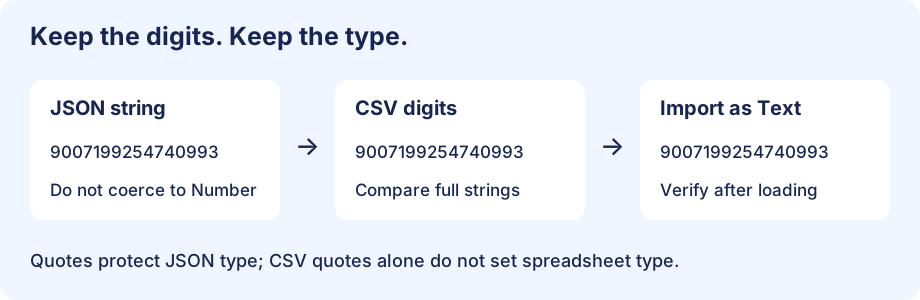
Store identifiers as JSON strings, export those strings unchanged, and import the CSV identifier column as Text. Check the identifier before conversion and after spreadsheet import. If a numeric parser has already rounded the source value, CSV quoting cannot restore it: obtain the original identifier from the source system.
This JSON to CSV converter guide addresses long-ID precision, rather than leading zeros. An identifier can have no leading zero and still lose its last digits. The original sample below separates two failure points: reading JSON as a number and importing CSV as a spreadsheet number.
Try two IDs that differ only at the end
These synthetic order IDs are deliberately similar. They are labels, not quantities to add or average. Keep them quoted in the JSON source:
[
  {"order_id":"9007199254740992","item":"blue"},
  {"order_id":"9007199254740993","item":"green"},
  {"order_id":"18446744073709551615","item":"amber"}
]
Download sample JSON · Download expected CSV. The files contain three records and two columns, counted from this sample; those are not traffic measurements.
First boundary: did JSON parsing change the ID?
JavaScript Number has a safe integer limit of 9007199254740991, documented by MDN. Above that boundary, not every integer is representable. This does not mean every larger integer is changed; it means exactness must not be assumed. RFC 8259 permits implementations to limit numeric precision and describes the interoperable integer range for common binary64 implementations.
// Run in a JavaScript console to compare the two source shapes.
const unsafe = JSON.parse('[{"id":9007199254740992},{"id":9007199254740993}]');
console.log(unsafe[0].id === unsafe[1].id); // true: distinct IDs collapsed
const safe = JSON.parse('[{"id":"9007199254740992"},{"id":"9007199254740993"}]');
console.log(safe[0].id === safe[1].id); // false: strings remain distinct
This is an original paired-ID check. In your own pipeline, inspect the raw JSON and the parsed value, not just the final CSV. If the API emits numeric IDs, ask for a string representation or use a parser designed to preserve the original number token. Converting an already rounded Number to a string merely preserves the wrong digits.
Second boundary: import the CSV as text
Microsoft documents Excel's 15-significant-digit numeric precision and recommends Text for longer codes. In Data → From Text/CSV, open the transformation editor and assign Text to the identifier column before loading. Inspect automatic type-conversion steps: replace a numeric conversion of the ID with Text at the step where the original digits are still available. Merely changing an already damaged cell's display format does not recover its value. Available automatic-conversion controls vary by Excel version; the linked Microsoft page states which versions support them.
Open the expected CSV in a plain-text editor first. Its ID cells should contain all the source digits:
order_id,item
9007199254740992,blue
9007199254740993,green
18446744073709551615,amber
A two-stage acceptance check
| Checkpoint | Compare | If it differs |
|---|---|---|
| Parsed CSV | Each order_id string against the original JSON string | Inspect source parsing and export coercion |
| Spreadsheet import | Cell text against the parsed CSV ID | Reimport the original CSV with ID typed as Text |
| Export from spreadsheet | Parse the new CSV and repeat the same string comparison | Check the spreadsheet's stored type and export path |
Use a stable row key or preserve this sample's order when comparing. Compare the full string, not a rounded display or a numeric equality check. Duplicate counts alone are insufficient: one changed ID can remain unique while still being wrong. Keep an untouched source copy so the first failing boundary can be located.
Question: Will double-quoting the CSV ID force Excel to keep it exact?
No. CSV quotes delimit a field; they do not declare its spreadsheet type. RFC 4180 defines quoted-field syntax without a per-column type schema. Treat the importer's Text setting as a separate decision. Do not prepend formula wrappers such as ="..." to a data interchange file: that changes the field into spreadsheet-specific content rather than preserving the identifier as ordinary data.
This question is derived from the roster's sourced precision problem, not presented as a quotation from a group discussion. The paired sample, two-boundary checklist and troubleshooting table are original additions.
Sources and related guides
Microsoft: long numbers and Text import · RFC 8259 section 6: numbers · RFC 4180: quoted fields.
Leading-zero identifiers · Verify exported records · Open the converter