Guides / API export completeness
Convert Paginated API JSON to CSV Without Missing Later Pages
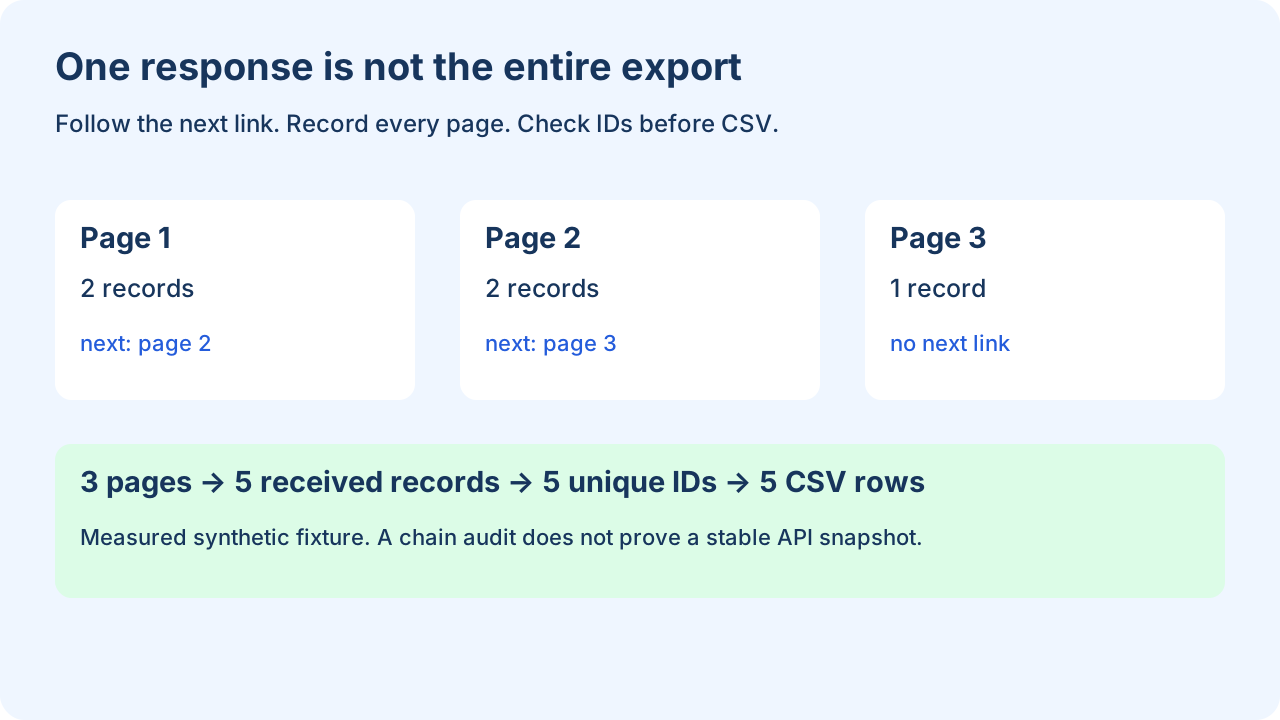
Collect every response in the documented pagination chain before using a JSON to CSV converter. Follow the next link until the API indicates the end; save each page's URL, status and record count, then check stable record IDs for duplicates. A CSV made from the first response contains only that response's records.
For GitHub REST pagination, follow rel="next" in the response Link header; do not invent the next URL or assume a last link always exists. See GitHub's pagination documentation. Other APIs use cursors or continuation tokens: apply that API's documented end condition.
What to save with each response
Save the response body and its pagination metadata together. The downloadable fixture uses a normalized capture format: url, status, next_url and records. It is not a raw API response. A collector must obtain these values from real requests, select the correct records array, and parse the API's pagination headers or tokens. The auditor below makes no network requests.
| Page | IDs received | Next page | New field |
|---|---|---|---|
| 1 | R01, R02 | 2 | id, name |
| 2 | R03, R04 | 3 | region |
| 3 | R05 | none | none |
Page 2 introduces region. Build the column union over the collected records so that the first page does not define an incomplete header. Keep missing region cells empty according to this example's explicit projection.
Run the chain audit before exporting
python audit-pagination.py pagination-sample.json run-001Use a new output directory. The script audits the whole captured chain before creating CSV. It refuses a missing next page, a repeated page URL, a non-200 response, an unreachable saved page or a duplicate string ID. This fixture contract expects arrays of objects with string IDs; adapt it deliberately when the API has a different response or key. APIs without stable IDs need a documented composite key or another comparison method.
Read the complete offline auditor
"""Audit saved pagination responses; no network requests. Python 3 standard library.
Input is normalized capture metadata, not raw HTTP or an API response.
Run: python audit-pagination.py pagination-sample.json new-output-directory
"""
import csv, json, sys
from pathlib import Path
bundle = json.loads(Path(sys.argv[1]).read_text(encoding="utf-8"))
pages = {}
for page in bundle["pages"]:
    if page["url"] in pages: raise ValueError("duplicate saved page URL")
    pages[page["url"]] = page
url = bundle["start_url"]
visited, ids, rows, ledger, columns = set(), set(), [], [], []
while url is not None:
    if url in visited: raise ValueError("pagination loop: " + url)
    if url not in pages: raise ValueError("missing saved next page: " + url)
    page = pages[url]
    if page["status"] != 200: raise ValueError("unsuccessful page: " + url)
    records = page["records"]
    if not isinstance(records, list): raise ValueError("records must be an array")
    for row in records:
        if not isinstance(row, dict) or not isinstance(row.get("id"), str):
            raise ValueError("every record needs a string id")
        if row["id"] in ids: raise ValueError("duplicate record id: " + row["id"])
        ids.add(row["id"])
        for key in row:
            if key not in columns: columns.append(key)
        rows.append(row)
    ledger.append({"url":url, "records":len(records), "next_url":page["next_url"]})
    visited.add(url)
    url = page["next_url"]
if visited != set(pages): raise ValueError("unreachable saved pages")
out = Path(sys.argv[2]); out.mkdir(exist_ok=False)
def cell(value):
    if value is None: return ""
    if isinstance(value, (dict, list, bool)): return json.dumps(value, ensure_ascii=False)
    return str(value)
with (out/"records.csv").open("w",encoding="utf-8",newline="") as handle:
    writer=csv.writer(handle); writer.writerow(columns)
    writer.writerows([[cell(row.get(key)) for key in columns] for row in rows])
report={"pages":len(ledger),"received_records":len(rows),"unique_ids":len(ids),
        "columns":columns,"ended_without_next":True,"page_ledger":ledger,
        "scope":"saved chain only; not a snapshot or permission completeness guarantee"}
(out/"manifest.json").write_text(json.dumps(report,indent=2)+"\n",encoding="utf-8")
print(json.dumps(report))
Check the measured results
The clean fixture produces 5 data records and 3 columns, with header id,name,region. The page ledger records 2 + 2 + 1 = 5 received records. The unique-ID set also contains five values: R01 through R05. These counts were obtained by running the downloadable script on the downloadable fixture.
In a deliberate failure case, changing page 2's R03 to R02 produces ValueError: duplicate record id: R02. The auditor stops before export. Do not silently drop repeated IDs: an overlap may hide changed records or an unstable pagination order. Investigate and rerun a fresh capture.
Read CSV with a CSV parser to count records, not by counting text lines. Quoted fields can contain newlines. Python's CSV documentation explains the reader and newline='' handling used here.
Question: How do I know every API page reached my CSV?
Check that every saved next pointer leads to a successful saved response, the final response has no next pointer under that API's contract, and received IDs match exported IDs. In this fixture, the manifest establishes a three-page chain and the CSV has the same five IDs. The first page alone would have only R01 and R02. Raising page size does not by itself prove that all records fit.
For a live export, record the limits too
- Use the endpoint's documented sort, filters and snapshot/cursor guarantees. Save capture timestamps and relevant parameters. If records change while fetching, a no-duplicates check alone cannot detect all omissions.
- Treat timeouts, authorization failures and rate limits as an incomplete capture. Retry according to the API's instructions; never label a partially collected file complete.
- This offline example holds rows in memory and requires all captured pages. It is not a large-file streaming exporter.
- CSV is a projection: nested values become JSON text and null/missing become blank. Preserve the raw captures when those distinctions matter. Output I/O failures can leave incomplete files; require a completed manifest.
Open the JSON to CSV converter · Verify exported fields · Preserve field states