Guides / Timestamp units
JSON Epoch Timestamps to CSV: Seconds, Milliseconds and UTC
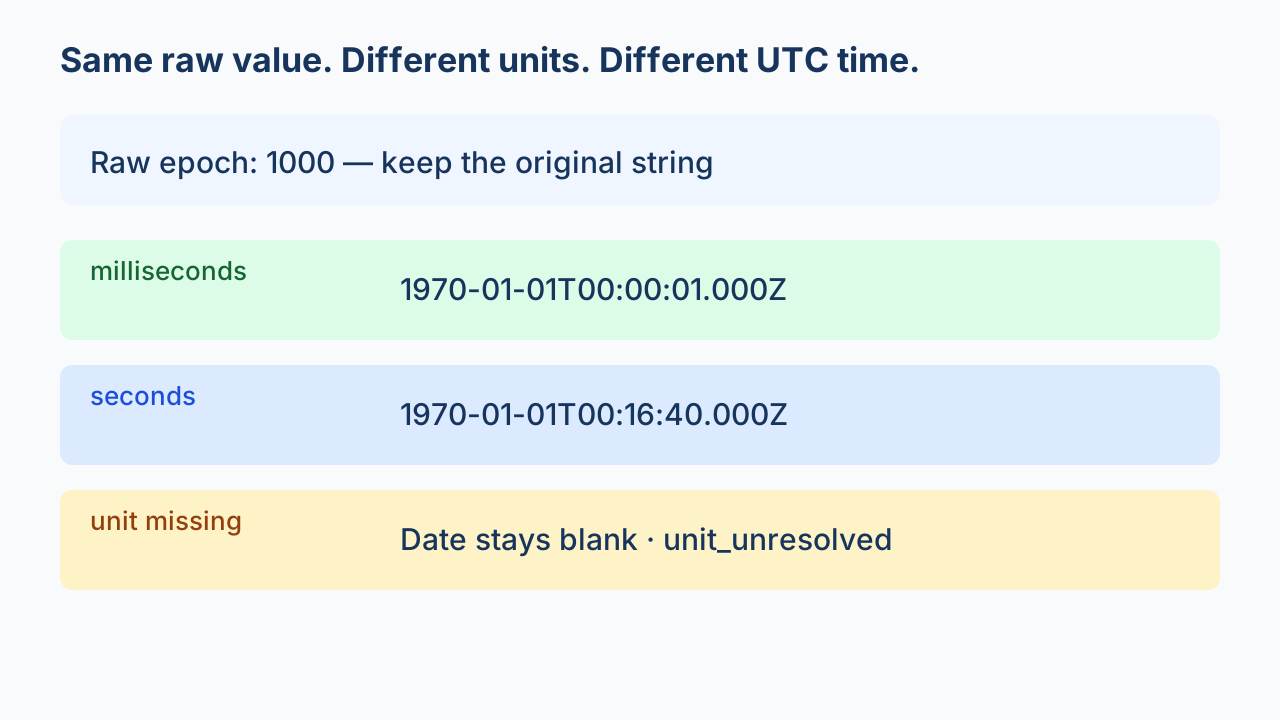
Preserve the raw epoch value, require its unit, and write the converted date into a separate UTC column. The value 1000 means 00:00:01 after the Unix epoch when it is milliseconds, and 00:16:40 when it is seconds. If the unit is unknown, keep the value and mark the date unresolved; do not infer the unit from its digit count.
Conversion is a mapping decision
A JSON to CSV converter can carry an epoch number into a cell without turning it into a date. CSV itself does not declare a column's date type. Decide whether the receiving system needs the original value, a UTC string, or both. This workflow keeps both and records whether conversion happened.
Read the unit from the source contract
Use the producing API's field documentation or an explicit unit column. Do not rely on a rule such as “ten digits means seconds.” The same short value is a useful counterexample, and historical dates can have shorter values. JavaScript Date uses milliseconds since the Unix epoch; that describes Date, not every API field.
Python's datetime documentation explains explicit UTC conversion and the difference from local-time conversion. The example below uses an aware UTC epoch plus an integer timedelta to avoid a floating-point division when converting milliseconds.
Download the original four-record example
The input has only id, epoch and unit. Epoch values are strings so their spelling remains available. E02 and E03 deliberately use the same raw value with different units; E04 deliberately lacks a unit.
python epoch-json-to-csv.py epoch-sample.json new-output.csvUse a new output filename. The exporter does not overwrite a previous export. It loads this small array in memory; it is not a streaming solution for giant files. Its fixed schema rejects unrelated fields rather than silently dropping them.
| ID | Raw value | Unit | Derived UTC | Status |
|---|---|---|---|---|
| E01 | 0 | seconds | 1970-01-01T00:00:00.000Z | converted |
| E02 | 1000 | milliseconds | 1970-01-01T00:00:01.000Z | converted |
| E03 | 1000 | seconds | 1970-01-01T00:16:40.000Z | converted |
| E04 | 1000 | (blank) | (blank) | unit_unresolved |
Local execution of this downloadable fixture produced 4 data records and 5 columns: three dates converted and one unit remained unresolved. These counts come from parsing the emitted CSV, not from counting text lines. They describe this fixture only.
Question: Can I tell seconds from milliseconds by the number of digits?
No universal digit-count rule can establish the unit. E02 and E03 both contain 1000, yet their documented units produce different UTC times. Ask for the field contract when the unit is missing. A date that “looks plausible” does not establish that the mapping is correct.
Keep uncertainty visible
unit_unresolved: the unit is absent or unsupported; the raw value stays in the CSV and the derived date is blank.integer_string_required: the value is not a signed integer string; this example does not guess how to interpret decimal seconds, whitespace or scientific notation.out_of_range: the derived value cannot fit the supported datetime range; keep it for investigation.converted: the mapping succeeded under this explicit unit and UTC policy; it does not prove the upstream clock was correct.
Read the complete exporter
Show the original Python code
"""Fixed-schema example: integer strings, explicit units, separate UTC column.
python epoch-json-to-csv.py epoch-sample.json new-output.csv
"""
import csv,json,re,sys
from pathlib import Path
from datetime import datetime,timedelta,timezone

EPOCH=datetime(1970,1,1,tzinfo=timezone.utc)
def derived(raw,unit):
    if unit not in ('seconds','milliseconds'):
        return '', 'unit_unresolved'
    if not isinstance(raw,str) or not re.fullmatch(r'[+-]?[0-9]+',raw):
        return '', 'integer_string_required'
    try:
        number=int(raw)
        delta=timedelta(seconds=number) if unit=='seconds' else timedelta(milliseconds=number)
        stamp=EPOCH+delta
        return stamp.isoformat(timespec='milliseconds').replace('+00:00','Z'), 'converted'
    except (ValueError,OverflowError):
        return '', 'out_of_range'

def export(source,target):
    rows=json.loads(Path(source).read_text(encoding='utf-8'))
    if not isinstance(rows,list) or not rows:
        raise ValueError('expected a nonempty array')
    for row in rows:
        if not isinstance(row,dict) or set(row)!={'id','epoch','unit'}:
            raise ValueError('exactly id, epoch and unit required')
        if not isinstance(row['id'],str) or not isinstance(row['epoch'],str):
            raise ValueError('id and epoch must be strings')
        if row['unit'] is not None and not isinstance(row['unit'],str):
            raise ValueError('unit must be text or null')
    count=0;unresolved=0
    with Path(target).open('x',encoding='utf-8',newline='') as file:
        writer=csv.writer(file)
        writer.writerow(['id','epoch_raw','epoch_unit','utc_iso','conversion_status'])
        for row in rows:
            iso,status=derived(row['epoch'],row['unit'])
            writer.writerow([row['id'],row['epoch'],row['unit'] or '',iso,status])
            count+=1;unresolved+=status!='converted'
    return {'records':count,'columns':5,'converted':count-unresolved,'unresolved':unresolved}
if __name__=='__main__':
    print(json.dumps(export(*sys.argv[1:3])))
Import the derived column deliberately
The exported date string ends in Z to make UTC explicit. Import the raw epoch column as text when exact digits matter. A spreadsheet may infer types on opening CSV, so check the actual import workflow rather than assuming displayed dates retain UTC. Preserve long numeric identifiers separately from date conversion.
Before accepting the output, compare source and parsed CSV record counts, compare raw values exactly, and inspect unit and status columns. Verify every row and field. For datasets that cannot fit memory, adapt a streaming export with a fixed schema to apply this mapping per record.
This integer-only example supports whole seconds or milliseconds, not nanoseconds, leap-second timestamps, arbitrary local calendar strings or consumer-specific spreadsheet serial dates. Resolving a unit or changing a time-zone presentation is an explicit data decision.
Open the JSON to CSV converter