Guides / Large files
Convert Large JSON to CSV Without Losing Late Columns
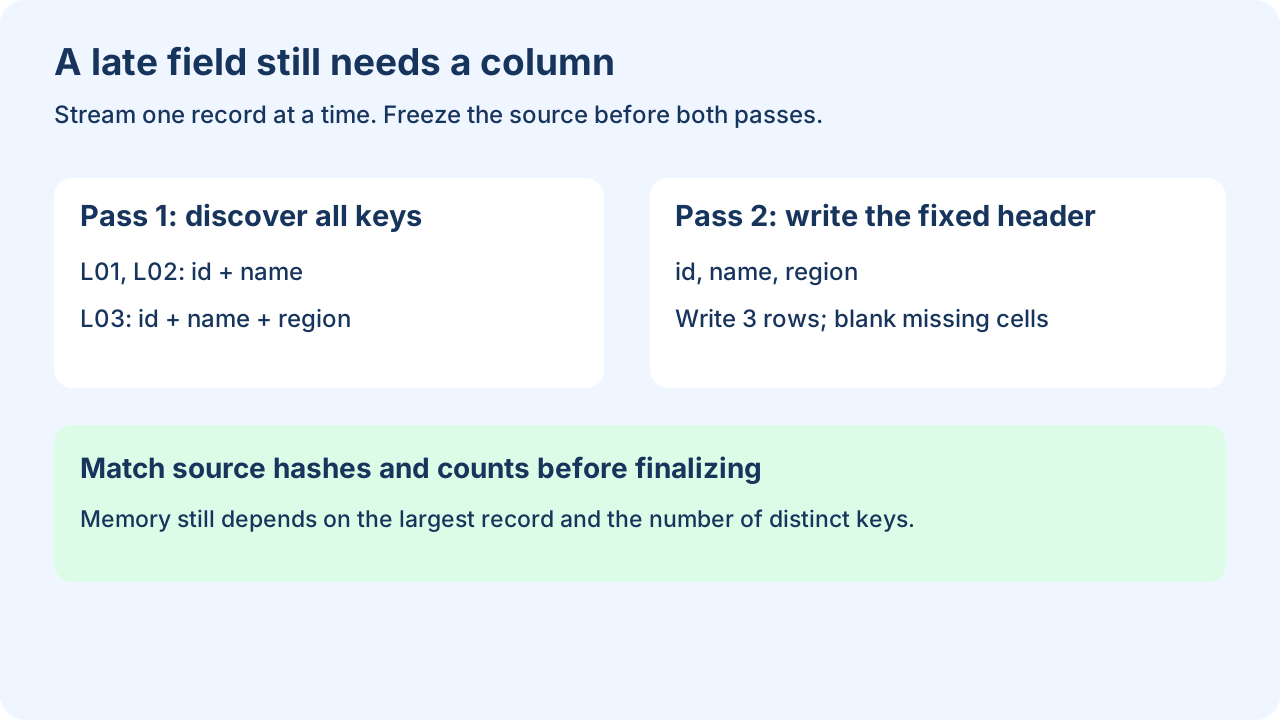
Keep an unchanged local JSON file and stream it twice: first collect every column name, then write one record at a time using that fixed header. This avoids holding every record in a list and keeps fields that appear near the end. The downloadable example targets flat objects; it refuses nested values instead of silently flattening them.
A browser JSON to CSV converter is convenient for inspectable inputs. If the file is too large for your workflow, use a local export. There is no universal safe file-size cutoff: the largest record, schema width, parser and available memory all matter.
Use the right record prefix
The example input has an object containing data.records, an array of objects. For ijson, select it with data.records.item; a top-level array uses item. This syntax is ijson's prefix syntax, not the browser tool's array-path syntax. Open the file in binary mode and iterate the selected items. The parser constructs each selected object, so one huge object can still require substantial memory.
{"data":{"records":[
  {"id":"L01","name":"Cedar"},
  {"id":"L02","name":"Maple"},
  {"id":"L03","name":"Birch","region":"West"}
]}}Run on a frozen local copy
python -m pip install ijson
python stream-json-csv.py streaming-sample.json data.records.item run-001
Use a new output directory. The example scans the entire input for keys before opening the CSV. It writes a partial file on pass two, checks the record count and source SHA-256 before finalizing, and writes a completed manifest. Keep the source unchanged throughout; hashes around the run detect ordinary changes but are not a substitute for a locked snapshot. Only consume an export with its completed manifest.
Read the complete original exporter
"""Two-pass flat-record exporter. Requires ijson; input must remain unchanged.
python stream-json-csv.py input.json data.records.item new-output-directory
"""
import csv, hashlib, json, os, sys
from pathlib import Path
from decimal import Decimal
import ijson

def digest(path):
    h=hashlib.sha256()
    with path.open('rb') as f:
        for block in iter(lambda:f.read(1024*1024), b''): h.update(block)
    return h.hexdigest()

def records(path,prefix):
    with path.open('rb') as f:
        for row in ijson.items(f,prefix,use_float=False):
            if not isinstance(row,dict): raise ValueError('selected items must be objects')
            if any(isinstance(v,(dict,list)) for v in row.values()):
                raise ValueError('flat records only; choose a nested-data policy first')
            yield row

def cell(value):
    if value is None: return ''
    if isinstance(value,bool): return 'true' if value else 'false'
    return str(value)

def export(source,prefix,out):
    source=Path(source); out=Path(out)
    before=digest(source)
    columns={}; count=0
    for row in records(source,prefix):
        count+=1
        for key in row: columns.setdefault(key,None)
    if not count or not columns: raise ValueError('no exportable records; check prefix and input')
    out.mkdir(exist_ok=False)
    partial=out/'records.csv.partial'; written=0
    try:
        with partial.open('w',encoding='utf-8',newline='') as f:
            writer=csv.writer(f); writer.writerow(columns)
            for row in records(source,prefix):
                if not row.keys()<=columns.keys(): raise ValueError('schema changed between passes')
                writer.writerow([cell(row.get(key)) for key in columns]); written+=1
        after=digest(source)
        if before!=after or written!=count: raise ValueError('input changed; export not finalized')
        report={'status':'complete','records':written,'columns':list(columns),
                'source_sha256':after,'prefix':prefix,'ijson_version':ijson.__version__,
                'backend':ijson.backend,'policy':'flat values; missing/null -> empty; no spreadsheet sanitization'}
        os.replace(partial,out/'records.csv')
        (out/'manifest.json').write_text(json.dumps(report,indent=2)+'\n',encoding='utf-8')
        return report
    except Exception:
        # Keep partial output for diagnosis. Never treat it as a completed export.
        raise

if __name__=='__main__':
    print(json.dumps(export(*sys.argv[1:4])))
What this example actually writes
id,name,region
L01,Cedar,
L02,Maple,
L03,Birch,West
Local execution with ijson 3.5.1 produced 3 data records and 3 columns; reading the CSV with Python's CSV reader confirmed both. An intentionally wrong prefix stopped with ValueError: no exportable records; check prefix and input. These counts describe this small fixture, not a large-file capacity benchmark.
Question: Can streaming JSON keep fields that appear only in the last record?
Yes, when you scan all records for the column union before writing the header. Our last record introduces region, while the first two leave that cell blank. A header taken only from L01 would omit it. If you cannot reread the input, use a declared schema or spool records to disk before writing a final CSV. Do not keep changing a CSV header after records have already been written.
Know the memory and data boundaries
- This implementation retains one selected object plus the distinct column names and parser buffers, rather than a list of all rows. The schema set can still grow without bound for data with constantly new keys. It makes no fixed RAM or file-size promise.
- It requires flat objects. For nested data, choose an explicit parent/child export or define your flattening policy before adapting the script.
- Missing and null values become blank cells; booleans become lowercase text. Decimal values use their parsed decimal representation. JSON number spelling and duplicate object keys are not preserved; keep the raw source if they matter.
- The exporter is an interchange example and does not sanitize spreadsheet formulas. Inspect untrusted cells and import into your spreadsheet under an explicit text/data policy.
- Output errors can leave a partial file, or a CSV without its manifest. Neither is a completed result. Malformed input and parser errors stop the run; no records are quietly quarantined.
Python CSV documentation supports the writer and newline="" handling used here. ijson's maintained documentation describes item iteration, prefixes and number options.
Open the JSON to CSV converter · Collect API pages first · Audit JSONL lines